
YouTube
Videos, Music and Live Streams


What Is YouTube?
YouTube is a global video-sharing platform owned by Google. Launched in 2005, it has grown into the largest online video ecosystem in the world.
Users can:
- Watch long-form videos
- Browse Shorts content
- Livestream events
- Upload original videos
- Subscribe to creators
- Listen to music and podcasts
- Interact through comments and community posts
Unlike traditional streaming services, YouTube is powered primarily by UGC (User-Generated Content), which means anyone can become a creator. Today, YouTube functions as: A video search engine, A social media platform, A creator economy ecosystem, A digital entertainment hub.
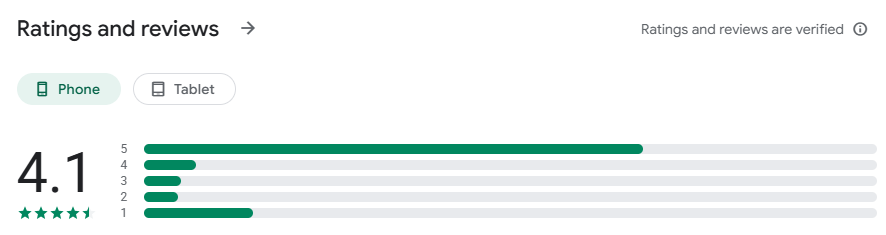
| 47M RATINGS | AGE RATING | CATEGORY | DEVELOPER | LANGUAGE | SIZE |
|---|---|---|---|---|---|
|
4.7 ★★★★★ |
13+ In-App Controls |
📷 Photo & Video |
👤 |
EN + 72 More |
364.9 MB |
YouTube App Overview
| Category | Details |
|---|---|
| App Name | YouTube |
| Developer | Google LLC |
| Platforms | Android, iOS, Web, Smart TV |
| Main Features | Video streaming, Shorts, Live Streaming, Music, Podcasts |
| Subscription | Free + YouTube Premium |
| Best For | Entertainment, Education, Creators, Podcasts |
| Content Resolution | Up to 8K HDR |
| Offline Downloads | Premium Only |
UI/UX Design: Smooth, Addictive, and Highly Optimized
Homepage Layout
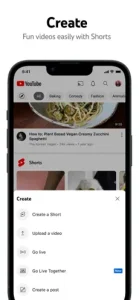
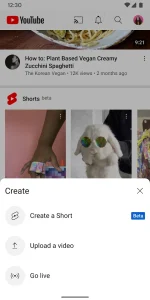
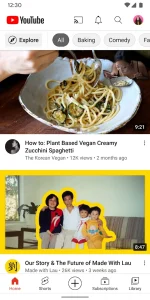
The YouTube mobile app uses a clean bottom navigation system featuring:
- Home
- Shorts
- Subscriptions
- You
- Create
The layout feels intuitive and optimized for one-handed usage. Compared to older versions, modern YouTube focuses heavily on:
- Infinite scrolling
- Personalized feeds
- Faster content consumption
- Algorithm-driven engagement
Pros of the UI
| Strength | Experience |
| Fast Navigation | Smooth transitions between tabs |
| Thumbnail Design | Excellent content visibility |
| One-Handed Use | Comfortable scrolling experience |
| Dark Mode | Eye-friendly during nighttime usage |
Cons of the UI
| Weakness | Impact |
| Shorts Placement | Feels overly aggressive |
| Ad Integration | Ads blend into recommendations |
| Endless Feed | Easy to lose track of time |
YouTube no longer feels like a “video tool.” It now behaves more like a fully optimized attention economy platform.
Player Experience: Industry-Leading Video Controls
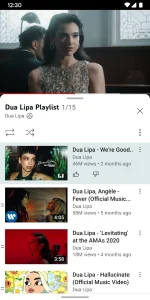
YouTube’s mobile player remains one of the best video playback systems in the industry.
Key Gesture Controls
| Feature | Experience |
| Double Tap Skip | Extremely responsive |
| Swipe Fullscreen | Smooth transition |
| Hold for 2x Speed | Useful for tutorials |
| Picture-in-Picture | Reliable multitasking |
| Auto Captions | Highly accurate |
The double-tap rewind/forward system has become so influential that many competitors—including Netflix and TikTok—have adopted similar controls.
Dark Mode Experience
YouTube’s Dark Mode uses dark gray instead of pure OLED black.
Benefits
- Reduced eye strain
- Better text readability
- Comfortable night viewing
Downsides
- Less battery saving on OLED displays
- Not as immersive as true black themes
Core Features and User Experience
Recommendation Algorithm: YouTube’s Most Powerful Weapon
YouTube’s recommendation engine is arguably the most advanced long-form content algorithm in the world.
The platform analyzes:
- Watch time
- Click behavior
- Search history
- Comments
- Likes and dislikes
- Video completion rate
A homepage that often feels frighteningly personalized. For new users, YouTube quickly identifies interests within just a few days of usage.
The Filter Bubble Problem
The downside of hyper-personalization is the creation of “content bubbles.” If you repeatedly watch one type of content—finance, gaming, politics, fitness—the homepage rapidly becomes dominated by similar recommendations.
Although YouTube provides options like: “Not Interested” or “Don’t Recommend Channel”, the algorithm still strongly influences content exposure. This has become one of YouTube’s most controversial design issues.
Shorts: YouTube’s TikTok Counterattack
YouTube Shorts is Google’s direct response to TikTok. The integration is now deeply embedded inside the main app.
Shorts Advantages
| Feature | Performance |
| Scrolling Speed | Extremely smooth |
| Discoverability | Very addictive |
| Creator Tools | Beginner-friendly |
| Algorithm Response | Fast and aggressive |
However, many long-time users believe Shorts is gradually damaging YouTube’s original identity as a long-form platform.
Community and Interaction
YouTube’s comment section remains one of the internet’s most unique social spaces.
Features include:
- Pinned comments
- Creator replies
- Live chat
- Community posts
- Timestamp discussions
Compared to Bilibili’s “bullet comment” culture, YouTube feels more like a traditional forum-style discussion environment.
Performance and Platform Optimization
Video Loading Speed
YouTube’s global CDN infrastructure remains one of the strongest in the industry.
Performance Highlights
| Category | Performance |
| App Launch Speed | Fast |
| Video Buffering | Minimal |
| Quality Switching | Stable |
| Streaming Stability | Excellent |
Video Quality Control
YouTube supports:
- 144p
- 360p
- 720p
- 1080p
- 4K
- 8K
- HDR
1080p Premium Bitrate
This provides:
- Sharper motion clarity
- Better shadow detail
- Reduced compression artifacts
The improvement is especially noticeable on tablets and TVs.Battery Usage and Resource Consumption. On flagship smartphones, YouTube performs extremely smoothly.
However, on lower-end devices:
- Shorts increases battery drain
- RAM usage becomes heavier
- HDR playback causes noticeable heat
60fps HDR content can significantly impact device performance.
Cross-Platform Ecosystem
YouTube’s Cast functionality remains one of the best available.
Compatible devices include:
- Smart TVs
- Chromecast
- Tablets
- Desktop browsers
Connection stability is excellent with low latency.
YouTube Premium: Is It Worth It?
Free Version Ads Are Becoming Overwhelming
The biggest frustration for free users is advertising.
Current ad formats include:
- Double ads
- 15-second unskippable ads
- Mid-roll ads
- Shorts ads
For heavy users, the free experience can become exhausting.
YouTube Premium Benefits
| Feature | Value |
| Ad-Free Viewing | Massive quality-of-life improvement |
| Background Play | Excellent for podcasts/music |
| Offline Downloads | Useful for travel |
| YouTube Music Included | Strong Spotify alternative |
Can YouTube Music Replace Spotify?
In some ways, yes.
YouTube Music has a major advantage in:
- Live performances
- Remixes
- Covers
- Rare unofficial uploads
This gives it a more diverse music library than many competitors.
Competitive Comparison
YouTube vs TikTok
| Category | YouTube | TikTok |
| Content Depth | Strong | Weak |
| Addictiveness | Moderate | Extremely High |
| Search Function | Excellent | Limited |
| Creator Monetization | Mature | Rapidly Growing |
YouTube vs Bilibili
| Category | YouTube | Bilibili |
| Global Reach | Massive | Mainly China |
| Community Culture | Forum-style | Bullet comments |
| Monetization | AdSense | Membership/Donations |
| Content Style | Diverse | Youth/Anime-heavy |
YouTube vs Netflix
| Category | YouTube | Netflix |
|---|---|---|
| Core Content Type | User-Generated Content (UGC) | Professionally Generated Content (PGC) |
| Main Focus | Open creator platform | Premium studio entertainment |
| Content Variety | Tutorials, podcasts, gaming, vlogs, documentaries, livestreams | Movies, TV series, original productions |
| Creator Access | Anyone can upload content | Only licensed studios and approved productions |
| Community Interaction | Comments, likes, livestream chat, subscriptions | Minimal social interaction |
| Content Length | Short-form + long-form mixed | Primarily long-form |
| Recommendation Style | Algorithm-driven personalization | Viewing-history-based recommendations |
| Monetization Model | Ads + Premium + creator revenue sharing | Subscription-based only |
| Live Streaming | Supported | Limited |
| Offline Downloads | Premium users only | Available on subscription plans |
| Strengths | Massive content diversity and creator ecosystem | High-quality cinematic storytelling |
| Weaknesses | Too many ads and inconsistent quality | Limited content variety outside entertainment |
YouTube Pros and Cons
🟢 Pros
✅ Largest video library in the world
✅ Outstanding recommendation algorithm
✅ Excellent player controls
✅ Supports 4K/8K HDR
✅ Mature creator ecosystem
✅ Strong cross-platform compatibility
🔴 Cons
❌ Too many ads
❌ Shorts feels intrusive
❌ Algorithm creates content bubbles
❌ Premium pricing is expensive
❌ High battery consumption on some devices
Who Should Use YouTube?
YouTube is ideal for:
- Students
- Podcast listeners
- Long-form video viewers
- Tech enthusiasts
- Content creators
- Music lovers
- Livestream audiences
If you regularly watch tutorials, interviews, documentaries, or educational videos, YouTube remains nearly impossible to replace.
Final Verdict
YouTube’s greatest achievement is that it has evolved beyond being “just a video app.” It has become part of the internet’s core infrastructure. Even as TikTok dominates short-form attention and Netflix leads premium entertainment, YouTube still offers:
- The largest content library
- The strongest creator ecosystem
- The best video search engine
- One of the most polished video players ever built
That said, YouTube also faces serious challenges:
- Aggressive advertising
- Algorithm addiction
- Shorts overload
- Declining community quality
Yet despite all of these flaws, if most users could keep only one video app on their phone…
it would probably still be YouTube.
Download YouTube Today

Whether you want to learn, relax, create content, or simply kill time, YouTube remains one of the most essential apps in the modern digital world. For casual users, the free version is still powerful. For heavy users, YouTube Premium dramatically improves the experience.