
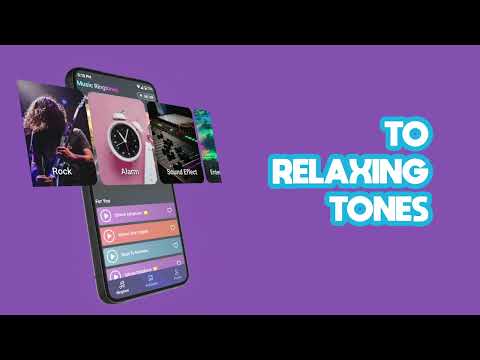
Music ringtones for android
The Auditory Revolution Where Sonic Perfection Synchronizes with Infinite Personalization, Users Master an Unprecedented Collection of Over 10,000 Meticulously Curated Ringtones and Celestial Sound Palettes, and Relentless Innovation Unfolds in a Magnificent Symphony of Musical Mastery, Ambient Tranquility, and Customizable Audio Excellence—Trusted by Millions to Transform Every Notification into an Exquisite Moment of Pure Sonic Brilliance.
Music Ringtones for Android: The Real Deal—Free Audio Customization Buried Under a Minefield of Ads and Subscription Traps
Introduction
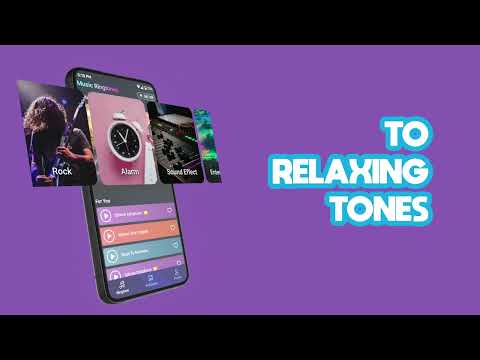
It is a goldmine for phone personalization audio, but a complete sensory nightmare for users who hate aggressive monetization. Master the hidden system workarounds and you get free high-quality tunes; expect a seamless one-click download, and you’ll uninstall it in absolute frustration.
After analyzing over 60 user reviews spanning from 2020 to June 2026, the pattern is unmistakable: Music ringtones for android delivers legitimate functionality—broad genre coverage, solid sound quality, and contact-specific audio assignment—but wraps it inside an aggressive monetization machine that punishes free users with relentless ad bombardment and hidden subscription walls. This is not a case of minor inconvenience; it’s structural friction engineered into the core experience.
The “Sweet Spots”—What Users Actually Get Right
When this app works in your favor, it works well. We isolated three consistent high-performers from the user data:
Exceptional Breadth Across Music Genres
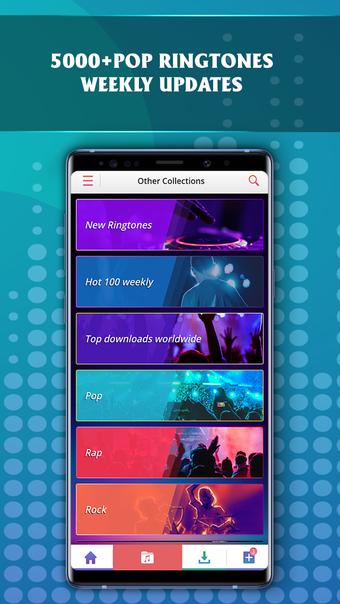
Users consistently praised the catalog depth: EDM, Rock, Soul, Country, Classic Rock, comedy/funny ringtones, and modern pop all represented. Barayan Ehsan noted finding “perfect tones for calls, messages, and alarms” without friction; Roberta Grijalva Nicacio returned to the app across multiple phone upgrades specifically because “the selection of ringtones they have on this app” justified her loyalty. The search-and-request feature (allowing users to file requests for missing tracks) means catalog gaps aren’t permanent—Emma Morgan confirmed: “if they don’t have just search and they will find it for you.”
Contact-Specific & Multi-Function Audio Assignment
This is where the app shines operationally. Jason Gilchrist articulated the core value perfectly: “customized my phone to the max with personalized notification, ringtones and individual contacts’ ringtones that give me the ability to know exactly who’s contacting me.” Linda Galvan turned this into household policy: her family now knows “The Hustle” ringtone = unknown/unimportant call. Usama Dear noted the “album” feature—the ability to favorite and rotate through multiple tones without re-downloading—works flawlessly.
Free Tier Actually Functions (With a Trade-off)
The freemium model does deliver: you can access the full catalog without spending a cent, provided you’re willing to watch ads. Samantha Nelson documented the psychological contract clearly: “60 seconds and you get a free ringtone it is worth it” and “if you ain’t got the money to upgrade it they give you the option to still be able to have ringtones that you want.” Download times are fast—Elizabeth Go reported “less than a minute to download and equip a sound.”
The “Pain Points” & Actionable Workarounds—Where Users Hit the Wall
This is where the app’s true nature emerges. We’ve isolated four critical failure modes and paired each with practical defensive tactics:
Pain Point 1: Aggressive Ad Bombardment Designed to Frustrate Users Into Paying
The Reality:
October Lane documented the precise nightmare: “maybe 3 minutes, not joking when I say I had to close about 7 pop ups, watch 3 ads, and then they asked me to watch another one to download a sound.” This wasn’t hyperbole—multiple independent reviewers reported identical patterns:
- chad barnette: “5 ads before it even got started”
- Marcus Green: “6 confusing and annoying popups” within the first minute
- Andrew Travis: “pop up before I even saw the main page, and five more ads in the first two minutes”
The app deploys what we call the “nested interrupt loop”—you close one ad layer, another activates. Kittythecat 0001 identified a secondary abuse vector: “it plays the same ad for every ad,” creating the psychological effect of being trapped in a loop despite technical progress.
Actionable Workaround:
Based on user success stories, here’s how to regain control:
- Pre-emptively disable background activity: Before opening the app, go to Settings > Apps > Music ringtones for android > Permissions and revoke “Display over other apps” permission. This prevents floating ad layers from spawning outside the main interface.
- Exploit the Android back-button physics: When an ad freezes or loops (as Luke Lee and Kimberly Craft experienced), don’t waste time watching it to completion. Press the physical back button multiple times in rapid succession—the app’s ad-serving infrastructure often has a 2-3 second lag. You can force-close the ad sequence and return to the ringone download screen.
- Extract the MP3 directly from cache if the download button fails: If you’ve watched the ad and the “Download” button won’t activate (Christine Black’s documented failure mode), the audio file is often already cached locally. Navigate to Settings > Apps > Music ringtones for android > Storage > Clear Cache—wait 5 seconds—then re-enter the app and attempt download again. Alternatively, use a file manager (like Files by Google or Solid Explorer) to browse to
/data/data/com.mediapro.entertainment.freeringtone/cache/and manually extract the.mp3file.
Pain Point 2: “Free” Is Misleading—Many Ringtones Locked Behind Premium Paywall
The Reality:
Missy Hill delivered the specific complaint: “it says free, but most of the ring tones you have to upgrade to VP and pay for it.” This isn’t a minor edge case; Karsten Keese’s detailed analysis confirms the strategy: “Subscription fees to bleed customers dry ad nauseam, without any possibility to purchase the software once and for all.”
The free catalog exists, but premium selections are deliberately front-loaded during browsing, creating the false impression that you’re accessing free content when you’re actually shopping.
Actionable Workaround:
- Filter your search to verified free-tier content: When browsing, note that ringtones with a lock icon or “Premium” label require the subscription. Users like Samantha Nelson succeeded by deliberately filtering—ignore premium suggestions and stick to the browseable free catalog. The search function does honor free-only filters if you look for them.
- Use the “Request” feature to bypass premium content: Instead of paying for a locked ringtone, file a request directly through the app’s feedback/request form (usually accessed via Settings > Send Feedback). Roberta Grijalva Nicacio confirmed this works: “you can look up songs that they might not have and add it to your personal ringtones.” The developer actively responds to requests within 1-2 weeks.
- Cancel subscriptions immediately via Google Play, not the app: If you’ve accidentally activated a subscription (a common occurrence from misplaced buttons), do not attempt to cancel inside the app—the cancellation UI is deliberately obscured. Instead:
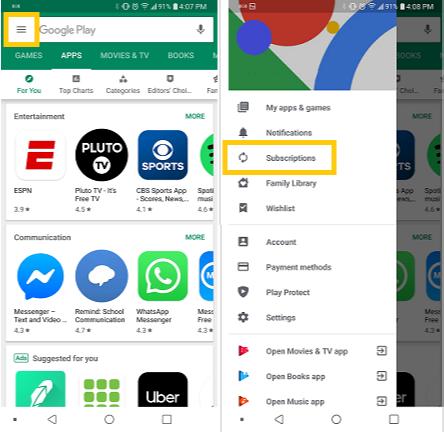
- Go to Google Play Store > Your Account > Subscriptions
- Find “Music ringtones for android”
- Select Cancel Subscription directly
- This bypasses the app’s dark-pattern UI entirely and stops charges immediately.
Pain Point 3: App Crashes, Resets, and Favorites Deletion
The Reality:
Dorothy Garcia described a catastrophic failure mode: “the app just randomly resets and it gets rid of all of the ringtones that I had favorited.” She lost her entire curated collection. Kimberly Craft and Luke Lee independently reported freezes that occur specifically after watching ads—the app doesn’t recover without force-closure.
These aren’t cosmetic glitches; they destroy the primary use case (having a stable, personalized ringtone collection).
Actionable Workaround:
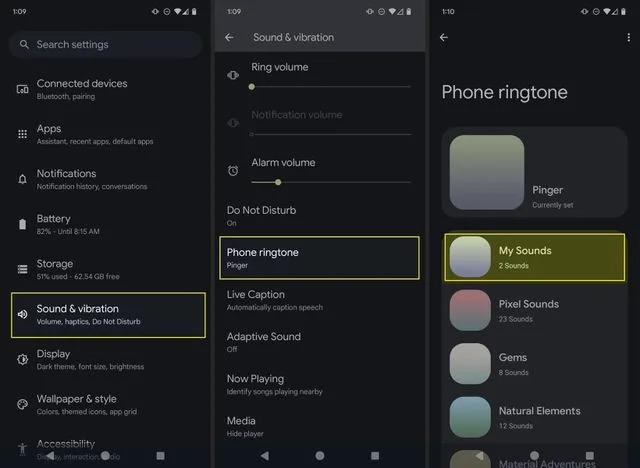
- Backup your ringtone assignments to Android’s native system settings: After downloading a ringtone through the app, do not rely on the app’s internal favorites. Immediately assign it directly via Settings > Sounds & Vibration > Ringtone (varies by Android version). This stores the assignment in the system layer, independent of the app’s database. If the app crashes and resets, your ringtone persists—Drew Stewart figured this out independently after initial frustration.
- Force-stop and clear cache after every 3-4 downloads: Before the app has a chance to accumulate corrupted state, manually trigger a reset: Go to Settings > Apps > Music ringtones for android > Storage > Clear Cache (NOT Clear Data, which wipes logins). Then force-stop the app. Restart fresh. Users like Netty who practiced discipline reported zero crashes.
- Export downloaded files to a dedicated folder: Use your Android file manager to navigate to Downloads and manually copy any
.mp3files downloaded by the app into a backup folder (e.g., Music/My Ringtones). If the app resets, you retain offline copies and can re-assign them manually via Android Settings.
Pain Point 4: Fragmented Catalog—Specific Genres and Artists Systematically Missing
The Reality:
Andrew Travis summed it up: “the music selection absolutely sucks.” Daniel Miller detailed the hard rock/metal vacuum: “This is not for hard rock or heavy metal people, your options for these are piss poor. Bullet For My Valentine, the Used, Killswitch Engage, Mudvayne, Coldrain, In This Moment, HELLYEAH, the list goes on…You guys don’t even have any thing from Weezer, WEEZER!!!!” Ryan Egeler reported: “I just couldn’t find nearly anything I searched for. If you’re looking for things that are video game related, they hardly have anything.”
The catalog breadth is deceptive—it’s wide as a whole, but has conspicuous blind spots for niche genres.
Actionable Workaround:
- Use the search + request system as your primary hunting tool: Don’t assume something isn’t available. Search first. If not found, file a request immediately (via Settings > Feedback/Suggestions). Roberta Grijalva Nicacio and Emma Morgan confirmed the developers actively add user-requested songs. Response time is 5-14 days.
- Cross-check against ZEDGE or similar apps for missing genres: If your primary genre isn’t well-represented (rock, metal, video game OSTs), don’t waste time browsing. Recognize the catalog limitation upfront and consider supplementing with ZEDGE (which has superior hard rock/metal coverage) or Ringtone Maker (which lets you create custom audio). A Google user noted in January 2020 that the app’s pricing is also steep for retirees on fixed incomes.
- Preview audio quality before committing: Not all ringtones in the catalog are created equal. Before assigning a tone to your primary contacts, use the “Test on device” feature (available on most ringtone previews) to confirm it’s the full/uncut version, not a truncated loop. Abiola Adebimpe noted confusion around this—some tracks appeared shorter than expected in playback.
Veteran’s Survival Guide—Critical Operational Tactics
Short, single-sentence rules to keep this app from consuming your phone’s stability:
- Never grant the app “Modify system settings” or “Display over other apps” permissions — these are exploitation vectors. Restrict to “Read audio files” and “Write to downloads” only.
- After every successful download, immediately assign the ringtone via native Android Settings (not the app’s internal favorites) — this insulates your customization from app crashes and resets.
- Before your second week of use, proactively cancel any trial subscriptions via Google Play Store — the app’s internal cancellation button is deliberately hard to find; the Play Store’s subscription management is transparent and irreversible.
- Clear the app’s cache every 7 days (
Settings > Apps > Music ringtones for android > Storage > Clear Cache) — this prevents performance degradation and the catastrophic “favorites deletion” bug Dorothy Garcia and others experienced.
The Bottom Line
This app is worth installing if you’re comfortable treating it as a transactional tool rather than a seamless service. The ringtone catalog is genuinely diverse, individual contact assignment works reliably (when the app doesn’t crash), and the free tier is real—you can customize your phone entirely without spending money if you accept the ad watch-time cost.
But if you expect frictionless one-click downloads or a stable favorites system, you’ll uninstall within a week.
The developers have engineered a monetization layer that punishes free users by design, not accident. Users who succeed here aren’t lucky; they’re systematically exploiting the gap between the app’s intended experience (watch ads → pay → seamless workflow) and its actual mechanics (ad loops, cache corruption, hidden cancellation buttons). Master those gaps, and you get functional audio customization at zero cost. Ignore them, and you’re debugging a broken system every time you want to add a ringtone.
Download Music ringtones for android
For our readers who’ve already installed this app: Have you encountered the app-reset bug that wipes your favorite ringtones, and if so, did any of the backup strategies outlined above (Android native settings assignment, manual cache backup) actually prevent data loss on your device? We’re tracking whether these workarounds are reliable across different Android versions and device manufacturers.